Java Full Stack Application: Complete End-to-End Flow Online Shopping Application
Explore a Java Full Stack Application with a complete end-to-end flow using Java, Spring Boot, React, REST APIs, databases and real-world development practices with Raise Tech.
Introduction
When we use an online shopping application, the experience looks simple from the user’s point of view. A customer opens a website, searches for a product, adds it to a cart, makes a payment and receives an order confirmation.
However, several technologies work behind that simple experience. They process requests, apply business rules, communicate with databases, connect with external services and return information to the user.
In this article, we explain how a typical Java Full Stack Application works from end to end. To make the explanation practical, we use a fictional online shopping platform called ShopKart.
ShopKart is an original educational concept. It does not copy any existing shopping platform.
Understanding the Project
Imagine that ShopKart is an online shopping application. Customers can register, log in, search for products, view product details, add products to a cart, place orders, make payments and track orders.
Administrators can also manage products, inventory and order status. Therefore, the application needs both customer-facing features and administrative functions.
A Java Full Stack implementation can combine several technologies.
- Frontend: React, HTML, CSS and JavaScript
- Backend: Java and Spring Boot
- API: REST APIs
- Security: Spring Security and JWT
- Database: MySQL
- Persistence: JPA and Hibernate
- Build Tool: Maven
- Version Control: Git and GitHub
- Deployment: Cloud platforms such as AWS
The Overall End-to-End Architecture
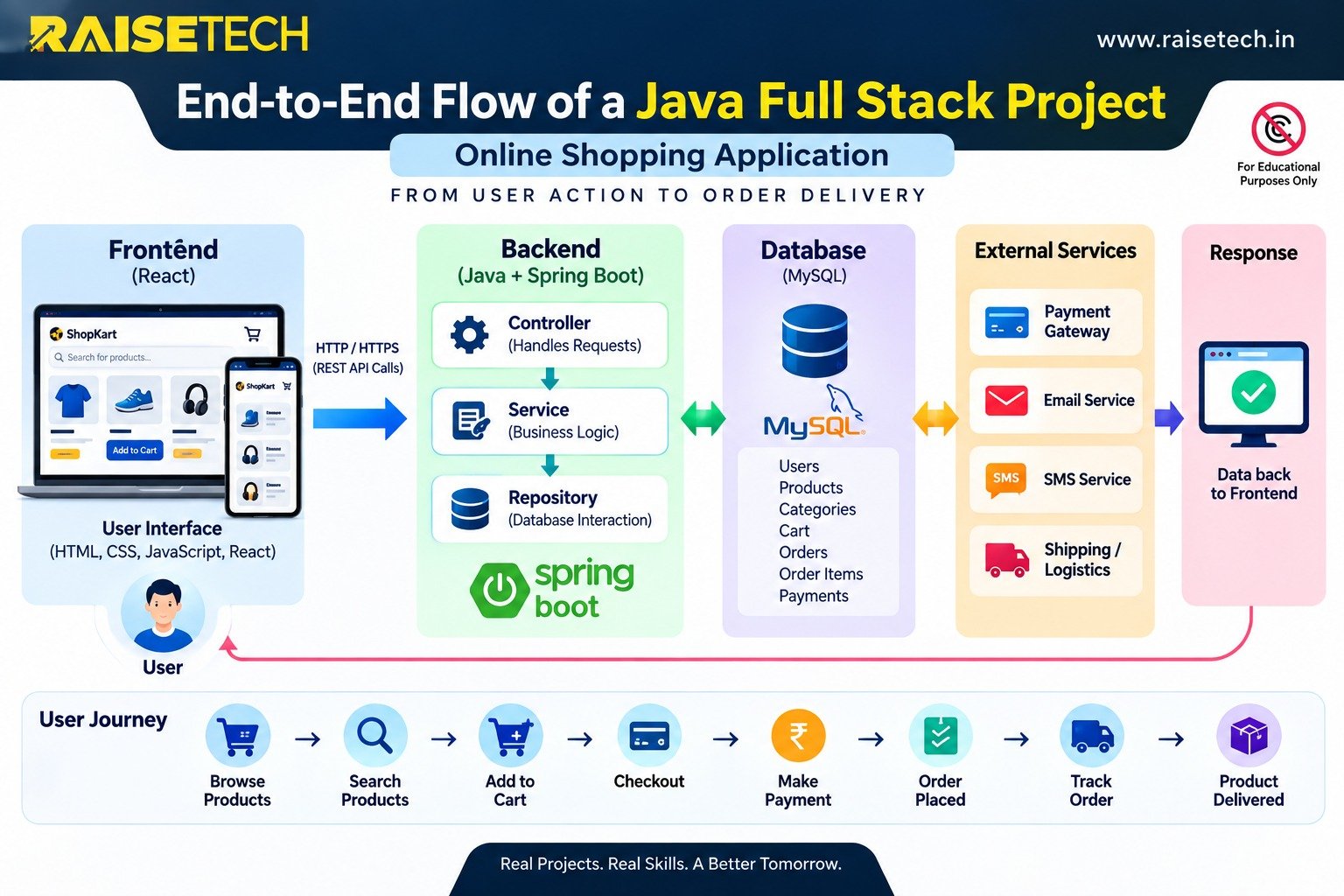
The complete application works as a connected chain. First, the user interacts with the frontend. Next, the frontend sends a request to the Java backend through a REST API.
Then, the backend processes the request and applies business rules. It can also communicate with the database or external services. Finally, the backend sends a response to the frontend.
The frontend then displays the result to the user.
User → Frontend → REST API → Java/Spring Boot → Business Logic → Database → Response → Frontend → User
Depending on the operation, the backend may also communicate with payment gateways, email services, SMS services or other third-party APIs.
How the End-to-End Flow Works
- The user performs an action on the frontend.
- React sends a request to the backend API.
- Spring Boot receives the request.
- The Controller handles the API request.
- The Service layer applies business rules.
- The Repository communicates with the database.
- The database returns the required data.
- The backend prepares the response.
- The frontend receives the response.
- The user sees the final result.
The Frontend: What the User Sees
The frontend provides the part of the application that customers directly use. Developers can build it with HTML, CSS and JavaScript. React can then provide a modern and interactive user interface.
When a customer opens ShopKart, the frontend can display the home page, product categories, search options, product cards, login and registration screens, shopping cart, checkout page and order history.
The frontend presents information clearly and collects user actions. However, it should not handle critical business decisions on its own.
Instead, the frontend communicates with the backend when it needs product, user or order information.
Frontend Responsibilities
- Display application screens
- Collect user input
- Send API requests
- Display API responses
- Provide navigation and user interaction
- Show validation messages and application status
How the Frontend Communicates With Java
Suppose a customer searches for a laptop. The React frontend can send an HTTP request such as GET /api/products?search=laptop.
The request reaches the Java backend. The backend processes the search and retrieves the relevant product information.
Next, the backend sends the response, commonly in JSON format. React receives the response and displays the matching products.
As a result, the customer sees a simple search screen while multiple technical operations happen behind it.
The Java Backend and Spring Boot
The backend handles much of the application’s business processing. Java provides the programming language, while Spring Boot helps developers build and run the backend application.
A well-structured Java application separates responsibilities into different layers. This approach makes the application easier to understand, test, maintain and extend.
Typical Backend Layers
- Controller: Receives API requests and returns responses.
- Service: Applies business rules and coordinates operations.
- Repository: Communicates with persistent data.
- Database: Stores application information.
The Controller Layer
The Controller acts as an entry point for many API requests. For example, a Product Controller can receive a request for product information.
The Controller can validate the required input and pass the operation to the appropriate Service.
However, the Controller should focus mainly on request and response handling. Developers should keep complex business rules in the Service layer.
The Service Layer
The Service layer contains the application’s business rules. For an online shopping application, these rules can include checking product availability, calculating prices and applying permitted discounts.
The Service can also validate orders, calculate totals and coordinate different operations.
By keeping business logic in the Service layer, developers can maintain the application more easily as the project grows.
The Repository and Database Layer
The Repository layer handles communication with persistent data. Developers can use JPA and Hibernate to map Java objects to database records and simplify database operations.
For ShopKart, MySQL can store information about users, products, categories, carts, orders, order items, payments and reviews.
Therefore, the database acts as the application’s long-term storage layer.
Database Connectivity
When a customer searches for a product, the request can travel through several layers.
- The frontend sends the search request.
- The Controller receives the request.
- The Service processes the request.
- The Repository queries the database.
- MySQL returns matching records.
- The backend prepares the response.
- The frontend displays the results.
For example, a Products table could contain product ID, product name, price, category and available stock.
The Java application retrieves the required information and converts it into a response that React can display.
User Registration and Login
Authentication plays an important role in a full stack application. A customer may create an account using an email address and password.
During login, the frontend sends the credentials to the backend through a secure connection. The backend verifies the credentials and establishes an authenticated session or token-based authentication flow.
A common approach uses JWT-based authentication together with Spring Security.
Adding a Product to the Cart
After logging in, the customer can select a product and click Add to Cart. The frontend then sends the required product and user information to the backend.
The backend verifies that the user has permission to perform the operation. It also checks whether the product exists and whether sufficient stock remains.
If the request passes validation, the backend saves or updates the cart information in the database.
This process shows why developers should keep critical business logic on the backend. The browser should not decide whether an item is actually available.
Checkout and Order Processing
When the customer proceeds to checkout, the application brings together the cart items, customer information and delivery details.
The backend can calculate the order total, apply valid discounts, include delivery charges and perform the required validation.
Most importantly, the server should calculate and validate important financial values. It should not rely only on values received from the browser.
This approach helps protect the integrity of the transaction.
Payment Integration
The payment stage may involve an external payment gateway. The ShopKart backend can start the payment process and receive the payment result through the gateway integration.
A simplified payment flow looks like this:
Customer → Frontend → Java Backend → Payment Gateway → Payment Result → Java Backend → Database
After successful payment confirmation, the backend can create or confirm the order. It can also record the payment status and update inventory.
The exact payment workflow depends on the selected payment provider and its integration requirements.
Order Confirmation and Tracking
After the application creates an order, it generates an order identifier and stores the order details.
The order can move through different statuses, such as:
- Confirmed
- Packed
- Shipped
- Out for Delivery
- Delivered
When the customer opens the My Orders section, React requests the latest order information from the backend.
The backend retrieves the relevant records from the database and sends them to the frontend. The customer can then view the current order status.
The Role of REST APIs
REST APIs provide the communication bridge between the frontend and backend. Different operations can use different API endpoints.
For example, product search, user login, cart operations and order retrieval can each have dedicated endpoints.
Examples of API Operations
GET /api/products– Retrieve productsPOST /api/login– Authenticate a userPOST /api/cart– Add an item to the cartGET /api/orders– Retrieve ordersPOST /api/orders– Create an order
As a result, the API layer gives the frontend a structured way to request information and perform operations without directly accessing the database.
Security in a Real Application
Security remains an essential part of a production application. Authentication determines who the user is. Authorization determines what that user can do.
For example, a customer may view their own orders. In contrast, an administrator may add products, update inventory and manage order statuses.
Important Security Practices
- Use HTTPS for secure communication.
- Validate user input.
- Hash passwords securely.
- Implement proper access control.
- Protect APIs against common web vulnerabilities.
- Secure application configuration.
- Maintain appropriate security logs.
These practices help developers build a safer and more reliable application.
Testing the Application
Before developers release the application to real users, they need to test individual components and complete workflows.
JUnit can support unit testing, while suitable API testing tools can help test backend endpoints.
The development team should also test important business scenarios.
- User registration
- User login
- Product search
- Product selection
- Cart operations
- Checkout
- Payment processing
- Order creation
- Order tracking
Testing these workflows helps the team identify problems before users encounter them.
Version Control and Team Development
Real-world applications often involve multiple developers. Teams can use Git and GitHub to manage source code, track changes and collaborate.
Developers can work on separate features and review each other’s changes. They can then merge completed work into shared branches.
This workflow creates a more organized development process and maintains a history of project changes.
Deployment and Cloud
During development, the frontend, backend and database may run on local machines. After testing, the team can deploy the application to a cloud environment.
A simplified production setup can include a frontend application, a Java Spring Boot backend, a managed database and integrations with external services.
Cloud platforms such as AWS can provide the infrastructure required to run these components.
Deployment Considerations
- Environment configuration
- Application monitoring
- Logging
- Security
- Database backups
- Scalability
- Application availability
Therefore, deployment involves much more than simply uploading application files to a server.
Complete User Journey
Now, let’s follow one complete customer journey through ShopKart.
Step 1: Product Search
The customer opens ShopKart and searches for a laptop. React sends the search request to a Spring Boot REST API.
The Controller receives the request and passes it to the Service layer. The Service applies the required business logic and asks the Repository to retrieve matching records from MySQL.
Step 2: Display Products
MySQL returns the matching product information. The Repository passes the data to the Service, and the Service passes the result to the Controller.
The backend then returns the response to React. The customer sees the available laptops.
Step 3: Add Product to Cart
The customer selects a laptop and adds it to the cart. React sends the required information to the backend.
The backend validates the product, checks stock availability and saves the cart information.
Step 4: Checkout
The customer proceeds to checkout and enters delivery details. The backend calculates the order total and validates the required information.
The server also applies permitted discounts and delivery charges according to the application’s business rules.
Step 5: Payment
The customer starts the payment process. The Java backend communicates with the selected payment gateway and receives the payment result.
The application then records the payment status and continues the order process according to the payment result.
Step 6: Order Confirmation
After successful payment processing, the application confirms the order. It updates the relevant database records and adjusts inventory.
The customer receives an order confirmation and gets an order identifier.
Step 7: Order Tracking
Later, the customer opens the My Orders section. React requests the latest order information from the backend.
The backend retrieves the order status from MySQL and sends the information to React. The customer can then track the order.
Why This Matters for a Java Full Stack Developer
Learning Java Full Stack development involves more than learning Java syntax or writing individual programs.
A professional developer needs to understand how different parts of a software system work together.
What Developers Need to Understand
- How a user action becomes an API request
- How React communicates with the backend
- How Spring Boot processes requests
- How business rules work in the Service layer
- How applications store and retrieve data
- How APIs integrate external services
- How authentication and authorization protect applications
- How teams test and deploy applications
Once this end-to-end flow becomes clear, technologies such as React, Spring Boot, REST APIs, MySQL, JPA, Hibernate, Spring Security, Git and cloud platforms become easier to understand.
Each technology has a specific role within the larger application.
Suggested Java Full Stack Technology Stack
- Frontend: HTML, CSS, JavaScript and React
- Backend: Java and Spring Boot
- API Layer: REST APIs
- Security: Spring Security and JWT
- Persistence: JPA and Hibernate
- Database: MySQL
- Build Tool: Maven
- Version Control: Git and GitHub
- Testing: JUnit and API testing tools
- Documentation: OpenAPI or Swagger
- Deployment: Cloud infrastructure such as AWS
Java Full Stack End-to-End Project
At Raise Tech, learners can understand Java Full Stack development through practical project-based learning.
A complete Java Full Stack Application can connect frontend development, Java, Spring Boot, REST APIs, databases, authentication, business logic and deployment.
Working through an end-to-end project helps learners understand how individual technologies work together in a real-world application.
Conclusion
A real-world Java Full Stack Application combines multiple technologies into one connected system.
The frontend provides the user experience. REST APIs enable communication. Java and Spring Boot handle backend processing. The Service layer implements business rules.
JPA and Hibernate support database interaction, while MySQL stores application data. Security mechanisms protect users and APIs. External integrations add capabilities such as payments and notifications.
Most importantly, learners should understand the complete journey instead of treating every technology as an isolated topic.
When a developer can follow a user’s action from the frontend to the API, Java backend, business logic, database and external services, they begin to understand how a real-world Java Full Stack Application works.
Ready to Learn Java Full Stack Development?
Explore practical Java Full Stack training and project-based learning with Raise Tech in Ameerpet, Hyderabad.
Explore Java Full Stack Training